


Taxes
Create tax structures such as GST 18% from one or more tax rows, and see the effective tax rate that Superwise uses on orders and bills.
- Where to find it
- Company settings > General > Taxes
- Who can use it
- People who have the View Taxes permission. Creating needs Add, changing needs Edit and deleting needs Delete.
A tax structure is a named set of taxes that you pick on purchase orders (PO), work orders, quotations and bills. One structure can have one row, for example GST 18%, or several rows, for example CGST 9% and SGST 9%. Superwise adds the rows and shows the effective tax rate.
Before you start
- Know the name of each tax and its rate in percent.
- Know for each tax whether it applies to the basic amount only, or to the basic amount plus the taxes above it.
How to create a tax structure
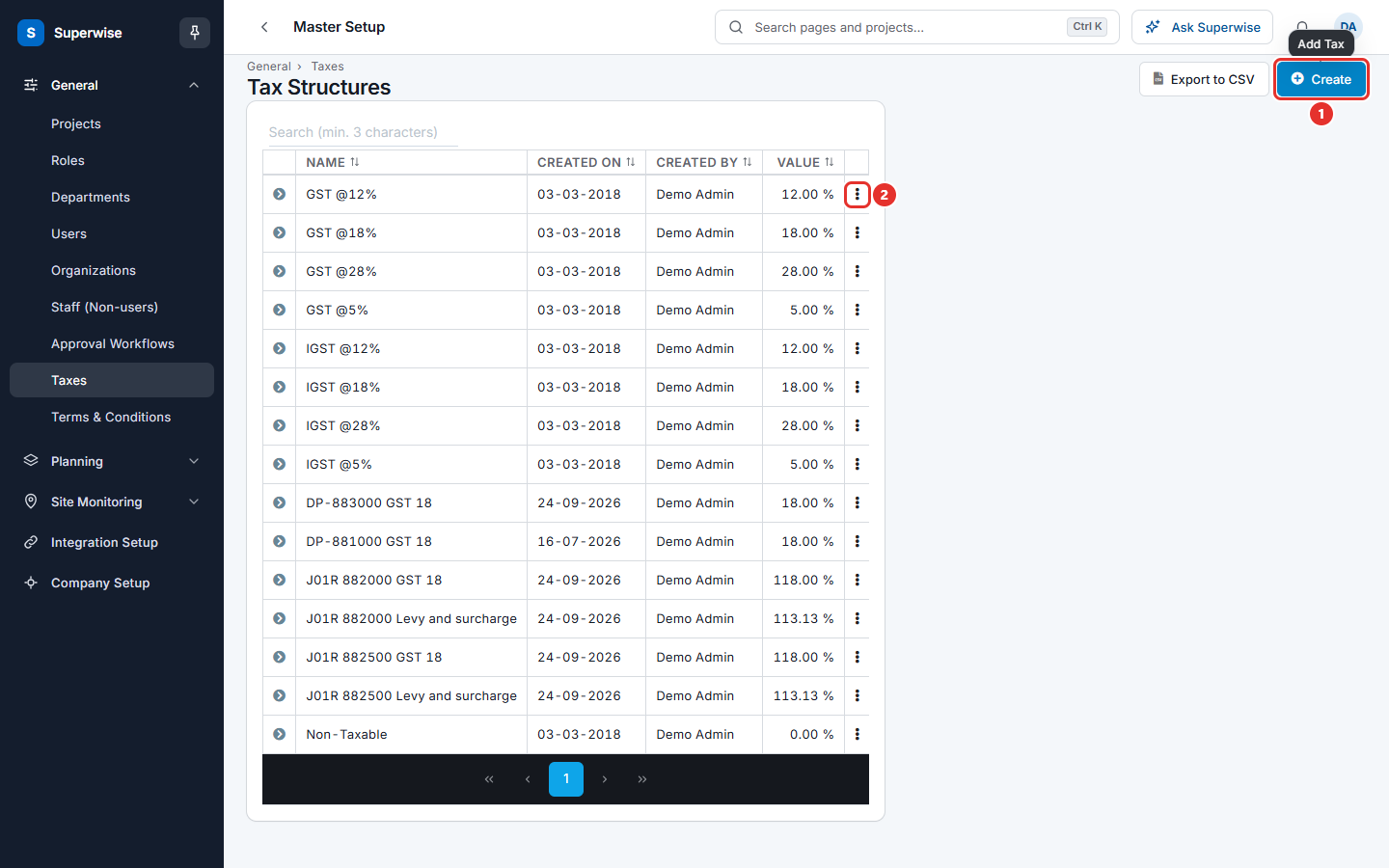
- Open Company settings in the left menu, then General, then Taxes.
- Click Create (mark 1 in the first picture).
- In Name (mark 1 in the second picture), type the name of the structure, for example GST 18%.
- Click Add New Row (mark 2). A new row appears.
- In the column Name of the row, type the name of the tax, for example CGST. It needs at least 2 characters.
- In the column Value (mark 3), type the rate in percent. Use a number from 0.01 to 99.99.
- Use the switch in the column On Basic Amount (mark 4) to say how the rate is applied. See the next section.
- Repeat steps 4 to 7 for each tax. Check Effective Tax at the bottom of the table.
- Click SAVE (mark 5). A message says Tax Saved Successfully!
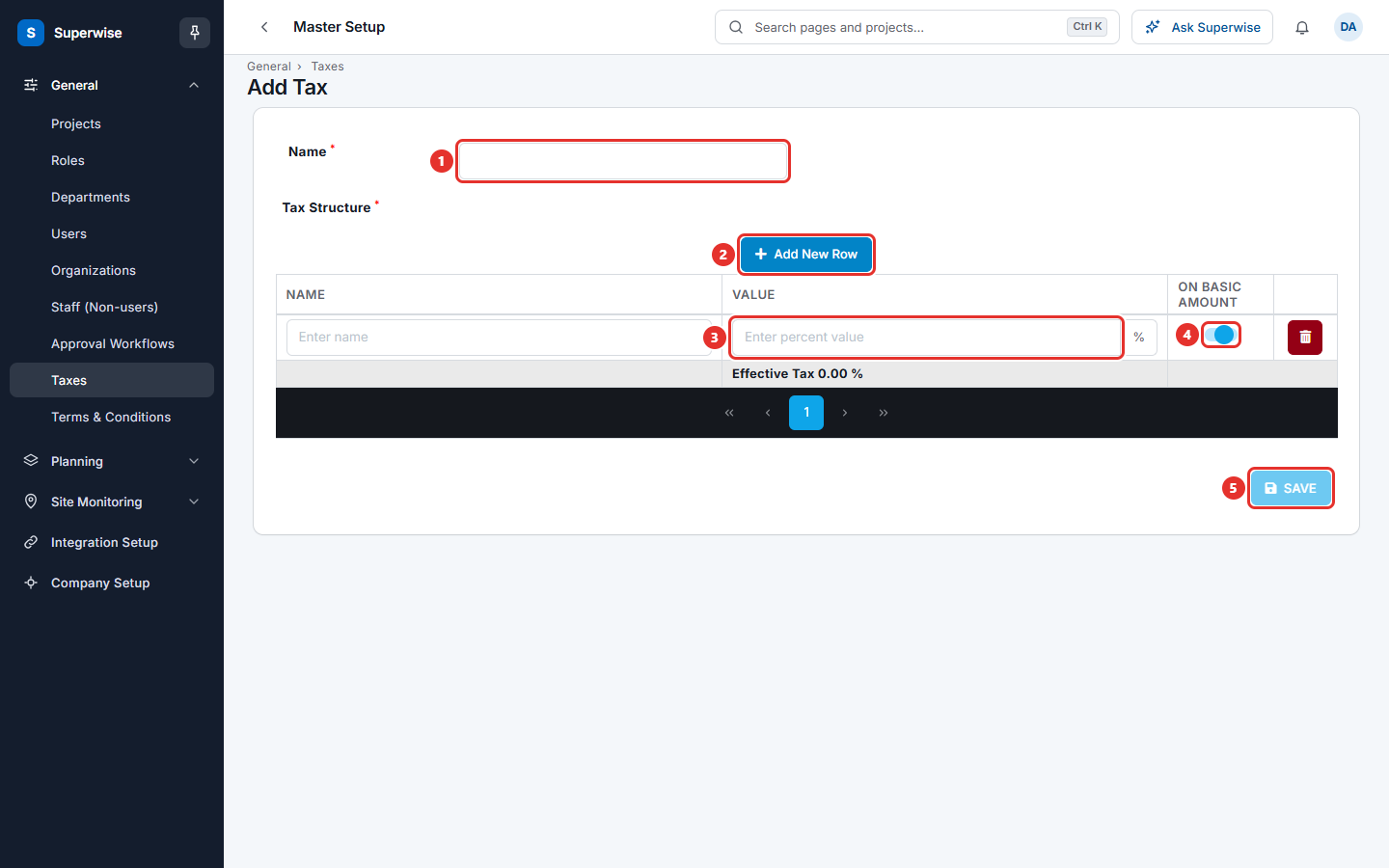
To remove a row, click the red bin icon at the end of the row.
What the switch On Basic Amount does
The switch decides which amount the rate is applied to.
- On: the rate is applied to the basic amount only.
- Off: the rate is applied to the basic amount plus the taxes of the rows above.
Example: The basic amount is 1000. Row 1 has 10% with the switch on, so the tax is 100. Row 2 has 5% with the switch off, so the tax is 5% of 1100, which is 55. Effective Tax is 15.5 %.
How to change a tax structure
- In the list, click the three dots at the end of the row.
- Choose Edit.
- Change the name or the rows and click SAVE.
How to delete a tax structure
- In the list, click the three dots at the end of the row.
- Choose Delete.
- Read the question and click Confirm.
What the columns mean
| Name | What it means |
|---|---|
| Name | The name of the tax structure. |
| Created On | The date the structure was created. |
| Created By | The user who created it. |
| Value | The effective tax rate in percent. |
What the fields mean
| Name | What it means |
|---|---|
| Name (top) | The name of the whole structure. Required. It cannot be used twice. |
| Name (row) | The name of one tax in the structure. Required. At least 2 characters. Each row needs a different name. |
| Value | The rate of one tax in percent. Required. From 0.01 to 99.99. |
| On Basic Amount | On: the rate applies to the basic amount. Off: it applies to the basic amount plus the taxes above it. |
| Effective Tax | The total rate that results from all rows. Superwise calculates it for you. |
Rules to know
- A structure needs a name and at least one row.
- Tax names must be different. The message is "Tax Name cannot be repeated".
- You cannot delete a structure that other records use. The message says which. Example: "Cannot delete Tax as it has Purchase Order linked to it." Records that use a tax include purchase orders, work orders, quotations, bills and resources.
If something goes wrong
| What you see | What to do |
|---|---|
| Tax Name is Required | Type a name in Name. |
| Tax structure value is not between 0 and 100 on Row No: | Change the Value in the named rows. |
| Tax structure does not have minimum 2 Character on Row No: | Type a longer name in the named rows. |
| Duplicate Tax Structure Name(s) found on Row No: | Give each row a different name. |
| Tax Name cannot be repeated | Use another name for the structure. |
| Please add tax Structure | Click Add New Row and fill in one row. |
| Cannot delete Tax as it has ... linked to it. | The structure is in use. Keep it. |