


Expense reasons
Set up the list of reasons for small cash expenses on site, such as Travel or Printing.
- Where to find it
- Company settings > Site Monitoring > Expense Reasons
- Who can use it
- People who have the View Other Masters permission and the View Cash Expenses permission. Adding, editing and deleting need the matching permission on the same master.
An expense reason says what a small cash expense on site was for. Examples are Travel, Site lunch and Printing. You create the list once. When site staff record a cash expense on the cash expenses page of a project (Misc. Expenses or Petty Cash in the menu), they choose one reason from this list.
Before you start
Nothing is needed first. Add the reasons your site teams use most.
How to add a reason
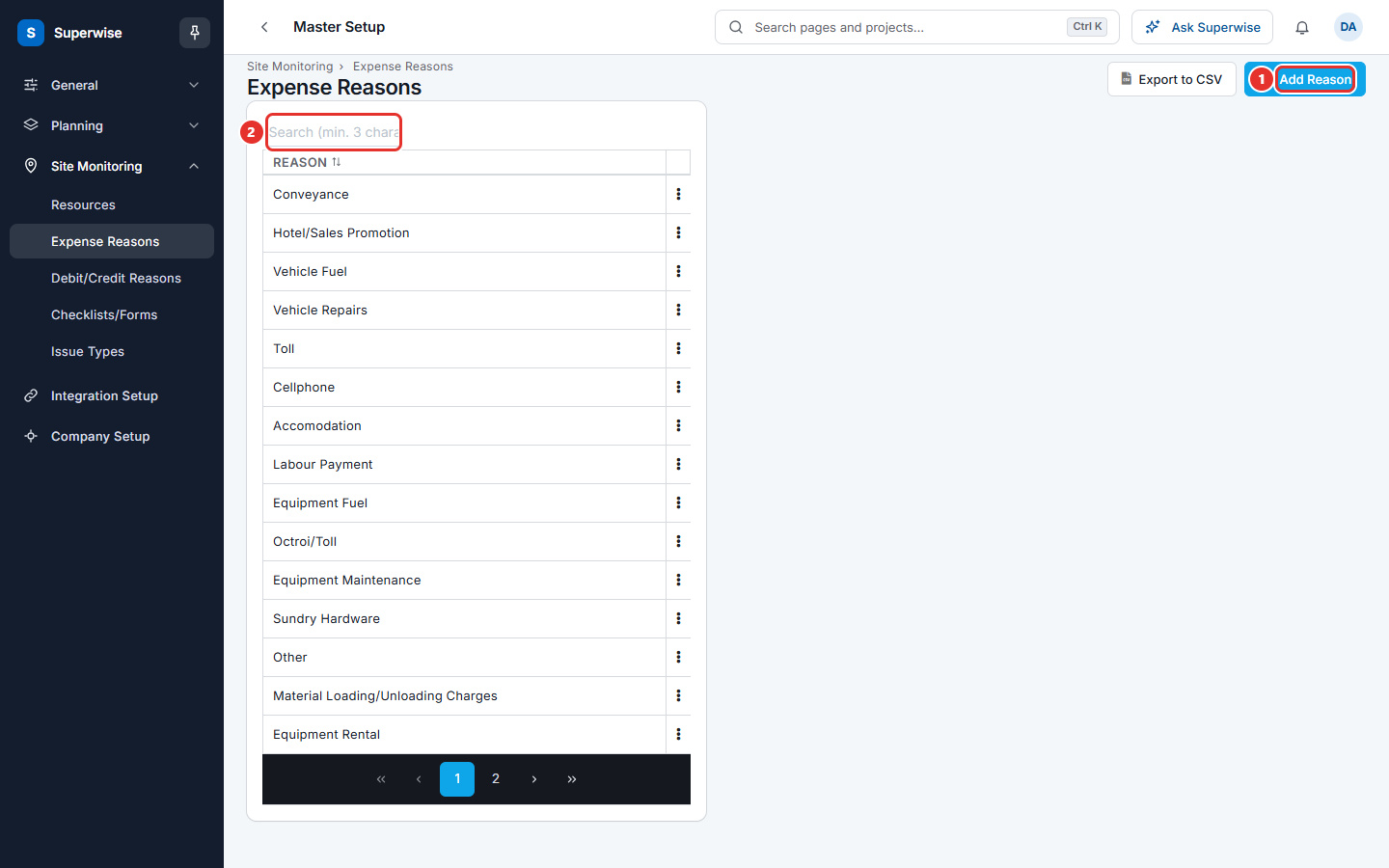
- Open Company settings > Site Monitoring > Expense Reasons.
- Click Add Reason (mark 1 in the first picture).
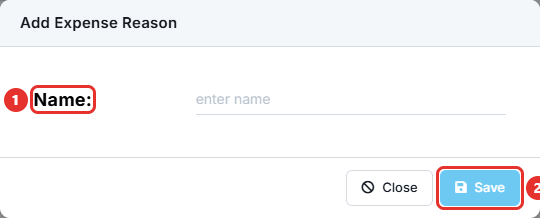
- Type the reason in Name: (mark 1 in the second picture). For example,
Printing. - Click Save (mark 2). The button stays grey until you type a name.
How to edit or delete a reason
- Click the three dots at the end of the row.
- Click Edit, change the name, and click Save.
- Or click Delete and confirm the question Are you sure that you want to delete this reason ?.
Type at least 3 characters in Search (min. 3 characters) (mark 2 in the first picture) to find a reason. Click Export to CSV to download the list.
What the columns mean
| Name | What it means |
|---|---|
| Reason | The name of the reason, as site staff see it when they record an expense. |
Rules to know
- A reason cannot repeat. The system shows Reason cannot be repeated.
- You cannot delete a reason that was used in a posted expense. The system shows Expense Vouchers have been posted with this reason.
- You see Edit only with the Edit permission and Delete only with the Delete permission.
If something goes wrong
| What you see | What to do |
|---|---|
| Reason cannot be repeated | Use the existing reason. |
| Expense Vouchers have been posted with this reason. | Keep the reason. Add a new reason for new expenses. |
| Expense Reasons is not in the menu | Ask your administrator for the View Other Masters and View Cash Expenses permissions. |
Related pages
- Debit / credit reasons: a similar list for supplier notes.
- Site monitoring masters: the order to set up the site lists.