


Edit a material supply
Change the date, the materials, the quantities or the remarks of a saved material supply.
- Where to find it
- Stores > Material Supply
- Who can use it
- People who have the Edit permission on Material Supply.
Use this form to correct a supply that site staff saved. For example, the staff typed 40 bags of cement but the contractor took 30. You can change the date, the materials, the quantities and the remarks. You cannot change the project or the contractor.
Before you start
- The supply must exist in the list. See Material supply.
- You need the Edit permission on Material Supply.
How to edit a supply
- Open Stores > Material Supply.
- Click the three dots at the end of the row and choose Edit. The form opens.
- Change Supplied On if needed (mark 1). Choose the date and time.
- Read Project and Supply To (mark 2). The screen shows them for information. You cannot change them.
- In the table, change the category, the material or the Quantity of a row. The unit is shown next to Quantity.
- To add a material, click Add Material (mark 3). To delete a row, click Remove at the end of the row.
- Type a note in Remarks. The earlier notes are shown under Previous Remarks.
- Click Save (mark 4). The list opens again.
Click Back to List to leave without saving.
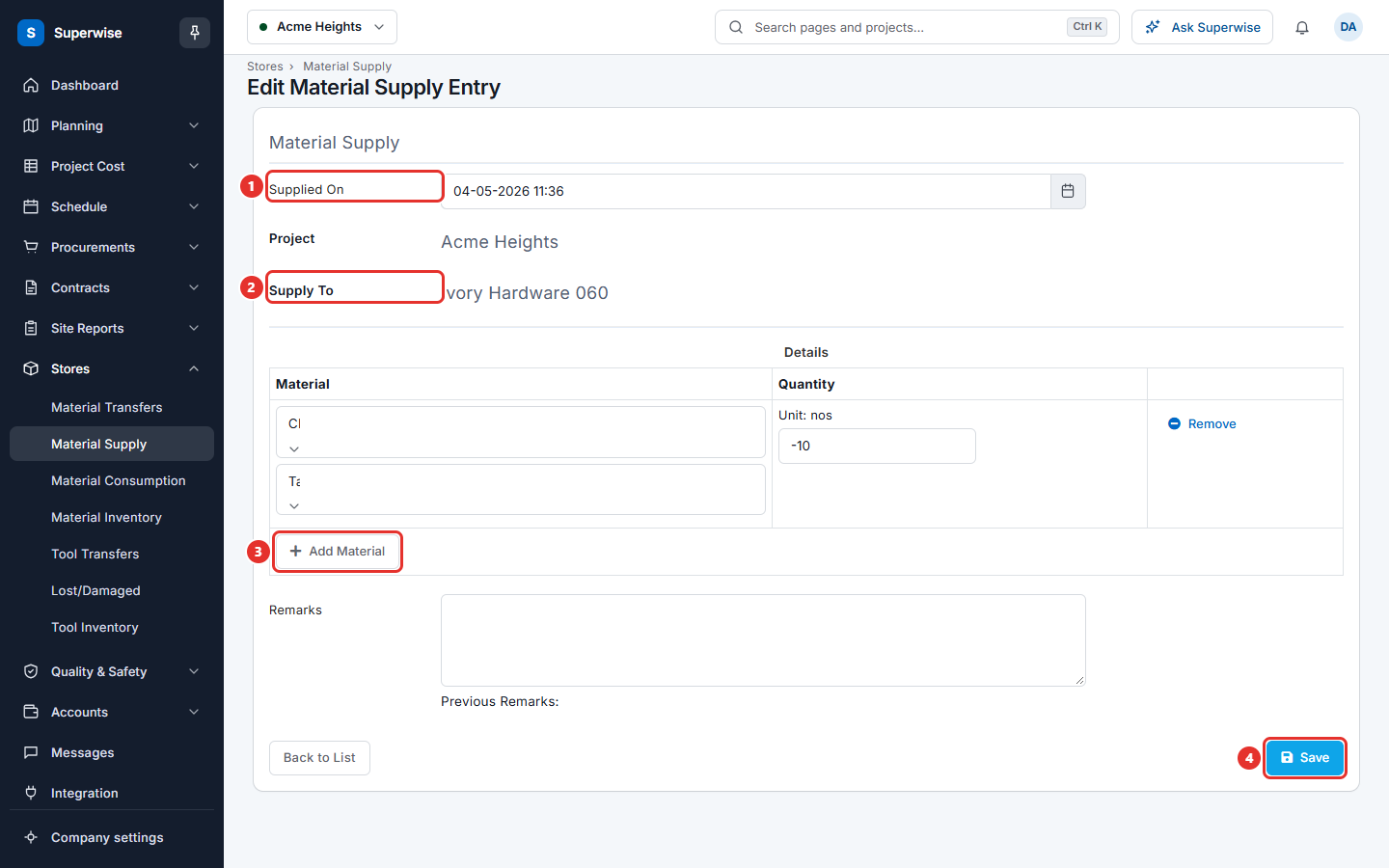
What the fields mean
| Name | What it means |
|---|---|
| Supplied On | When the contractor got the material. |
| Project | The project that gave the material. You cannot change it. |
| Supply To | The contractor. You cannot change it. |
| Material | The category and the material. Choose the category first, then the material. |
| Quantity | How much was supplied. Up to 4 decimal places. |
| Remarks | A note for the record. |
Rules to know
- If a row is debitable and you change its material or quantity, its debit note becomes pending again with a new amount.
- If you remove a debitable row, its debit note is removed too.
If something goes wrong
| What you see | What to do |
|---|---|
| The material supply could not be saved. Please try again; if it keeps failing, contact support. | Check the rows and try again. If the message stays, tell your administrator. |
| Could not load the material supply. Please contact support. | Go back to the list and open Edit again. |
| A red message under a field | Read the message and correct that field. |